Luca

For the self-employed

Invoices out, tax set aside, deadline handled.

Luca is a money hub for people who work for themselves and run the family money as well. One categorised ledger answers to your tax return and your household budget, so you are not keeping two sets of books.

Start a 30-day trial See it working

No card required. €79 a year after the trial, or €7.99 a month.

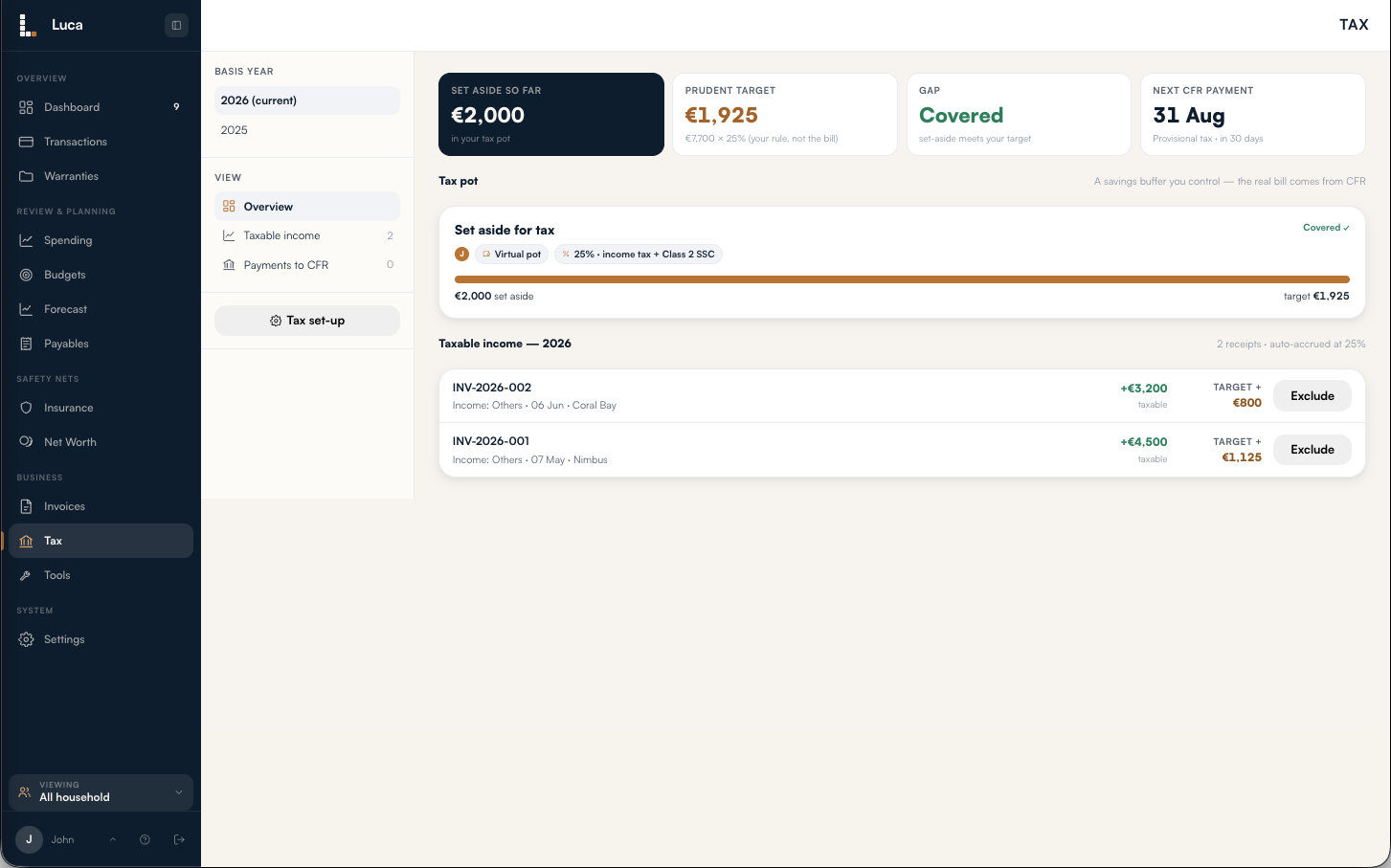
Luca's Tax overview: the amount set aside, the prudent target computed from real income, and the next payment date.

Tax: what the pot should hold, what is in it, and when the next instalment falls due.

Spending you can see

Categorisation that holds up across a business and a household at once

A chart of where your money went is the easy part. The hard part is one ledger that stays accurate when half the transactions are business costs, some are re-billable to a client, and the rest is the family shop. Luca is built around that problem.

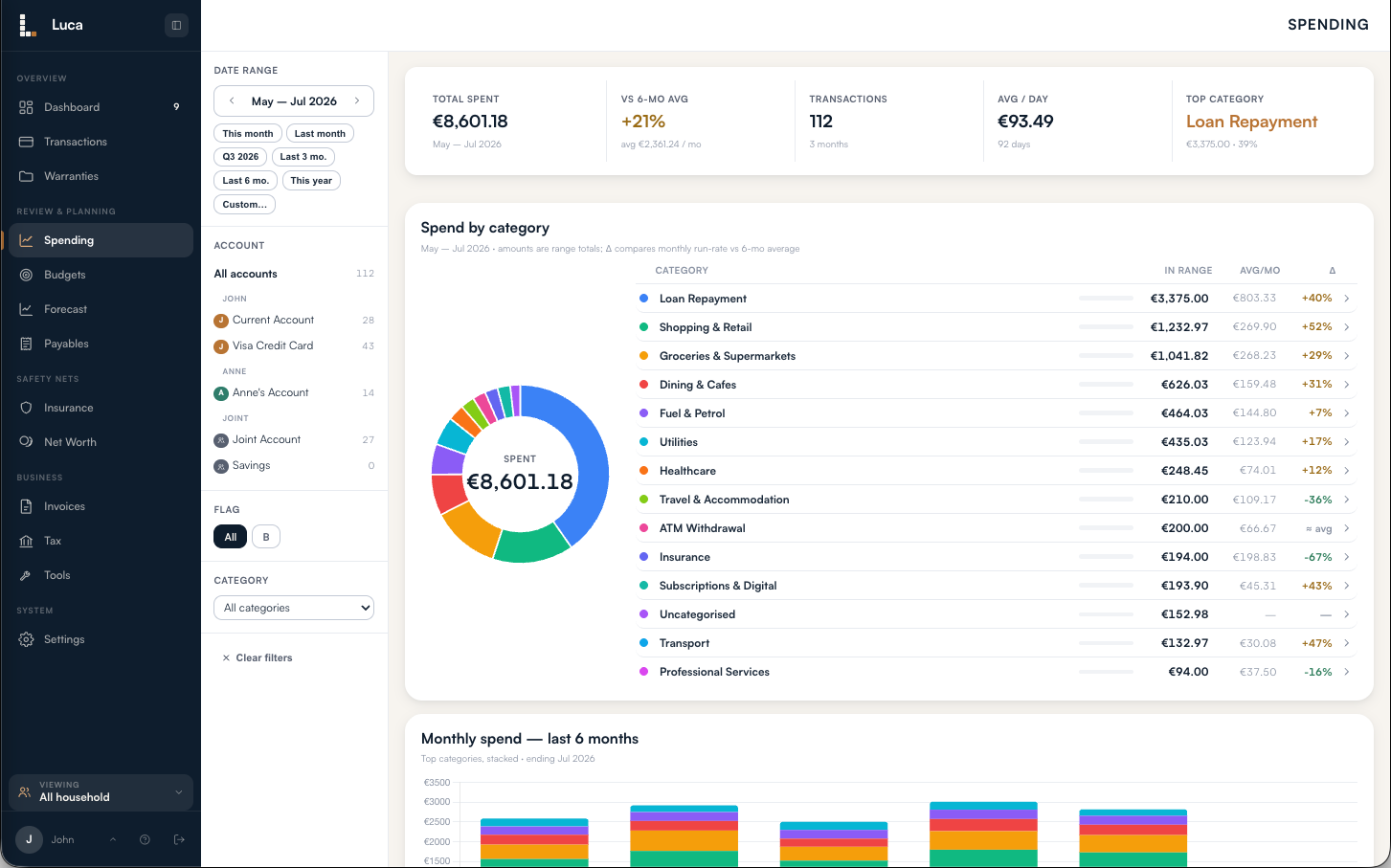
Luca's Spending screen: a donut of spend by category with a full legend, each row compared against the six-month average.

Every category set against your own six-month run rate, over any range you choose.

Rules that keep categorising

Set a rule once and it files that merchant every time a new statement comes in. Anything Luca cannot place waits in To review rather than quietly landing in the wrong column.

Business flag and client attribution

Flag a cost as business and it appears on the quarterly expenses report. Attribute it to a client and it appears on that client's monthly report too. Same ledger, no second set of books.

Sliceable by whose money it is

The household picture is the default view. Narrow to one person and balances, spending and the forecast all re-slice to that lens, and the lens follows you from page to page.

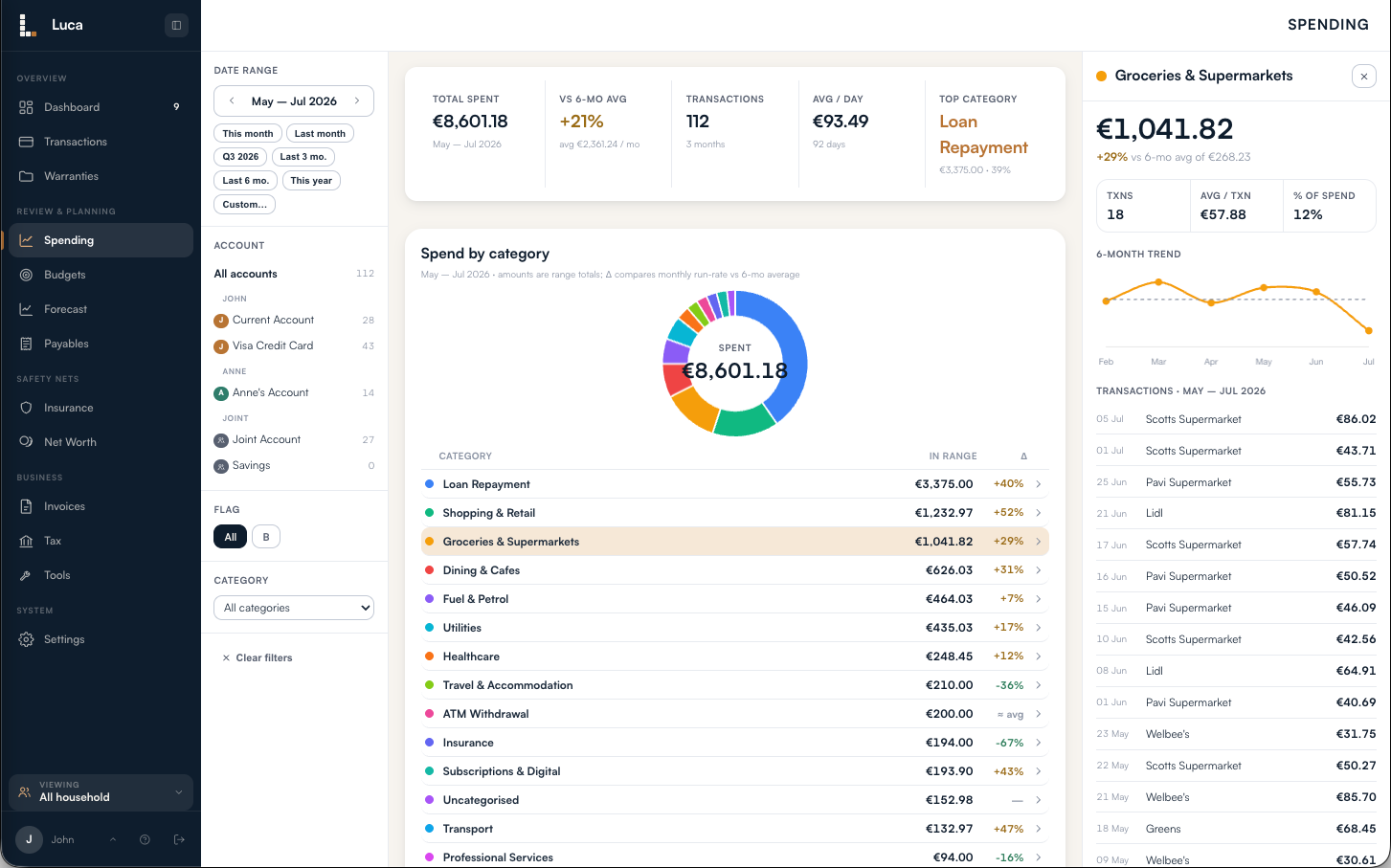
A category drilled open in Luca, showing its total, six-month trend and the transactions behind it.

Click any figure and the transactions behind it open in place, with the six-month trend.

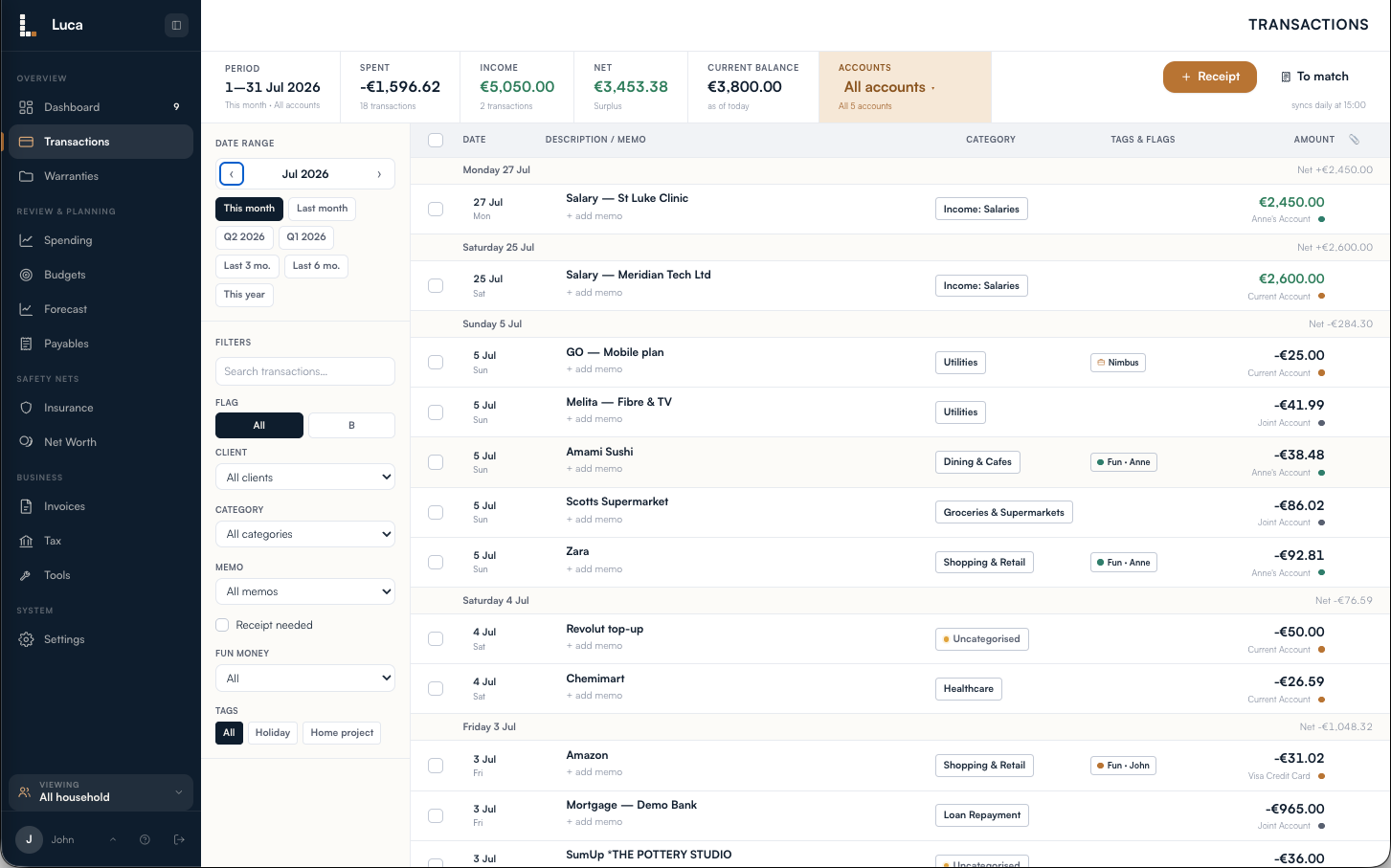
Luca's transaction ledger with categories assigned on every row.

The ledger itself: categorised on arrival, searchable, filterable by account, category or client.

Invoicing and getting paid

Issue it, share a link, watch the payment land

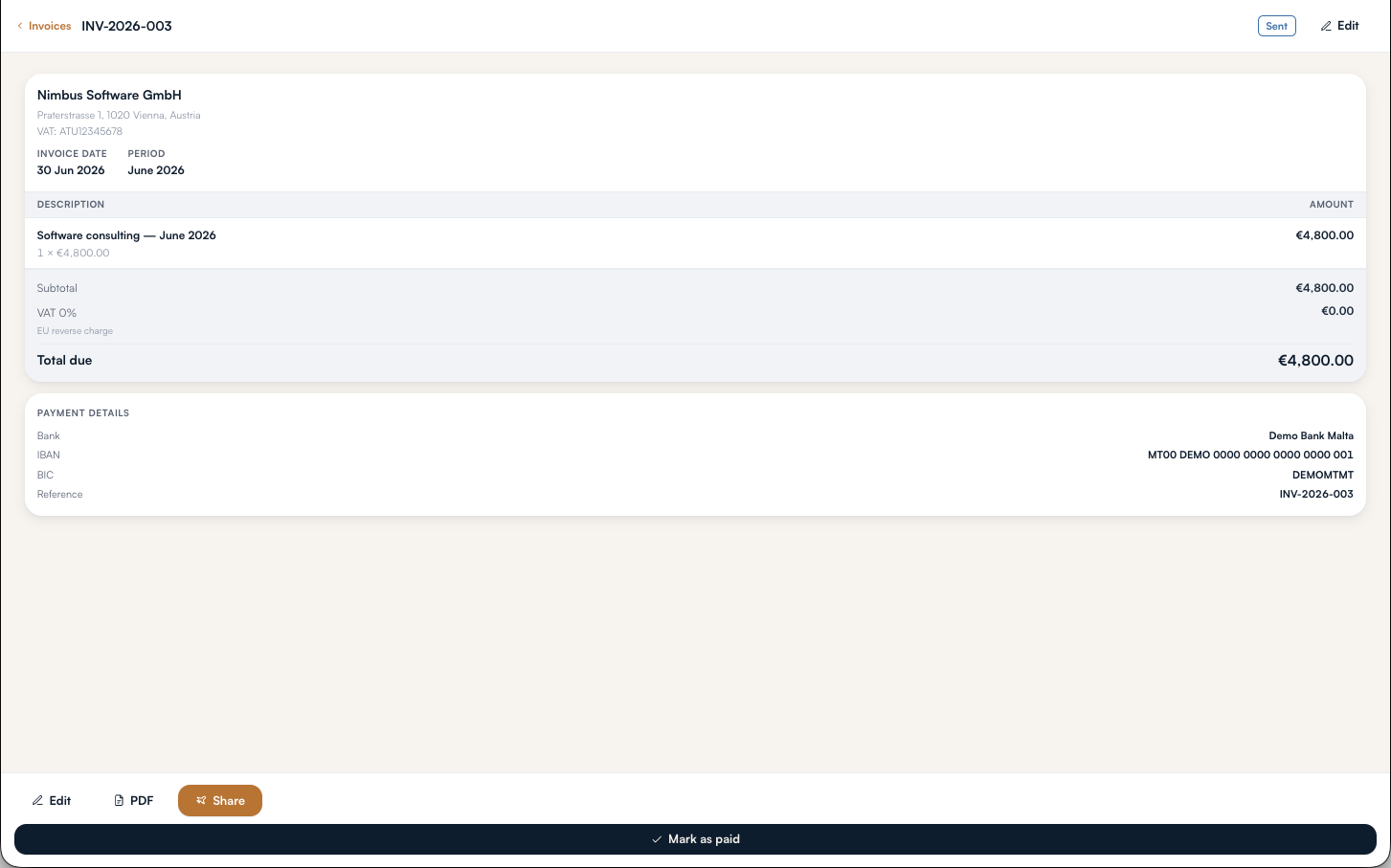
Line items, your VAT treatment, your bank details and your numbering, kept in your business profile so you set them once.

1

Draft it in a minute. Pick a client, add line items, auto-fill the billing period. Zero-rated EU reverse charge is built in if that is how you bill.

2

Share a private link. Your client opens a branded page with your payment details and a PDF to download. No login, no app chrome. Sharing marks the invoice sent.

3

It marks itself paid. When a matching payment shows up in your account, Luca detects it and moves the invoice to paid.

An invoice open in Luca with line items and totals.

Tax set aside as you earn

The money for tax stops being a surprise

Choose one blended rate. As income actually lands, Luca works out what the pot should hold, compares it with what you have put by, and tells you the gap. The instalment dates are already in there.

Computed from your own income

Counted when it is paid, not when it is invoiced. Exclude a receipt that is not really taxable income and the target moves with it.

A pot you can point at

Mirror a real account so the balance speaks for itself, or keep a figure you control if the money sits somewhere that fluctuates.

Deadlines already loaded

You never type a due date. When an instalment comes round, record what your notice says and the target steps down by the same amount.

To be clear about what this is. It is a prudent savings rule of thumb, arithmetic on your own income at your own rate. Luca is not a tax calculator and gives no tax, investment or financial advice. The real bill comes from your assessment.

The forward view

What the balance does over the next ninety days

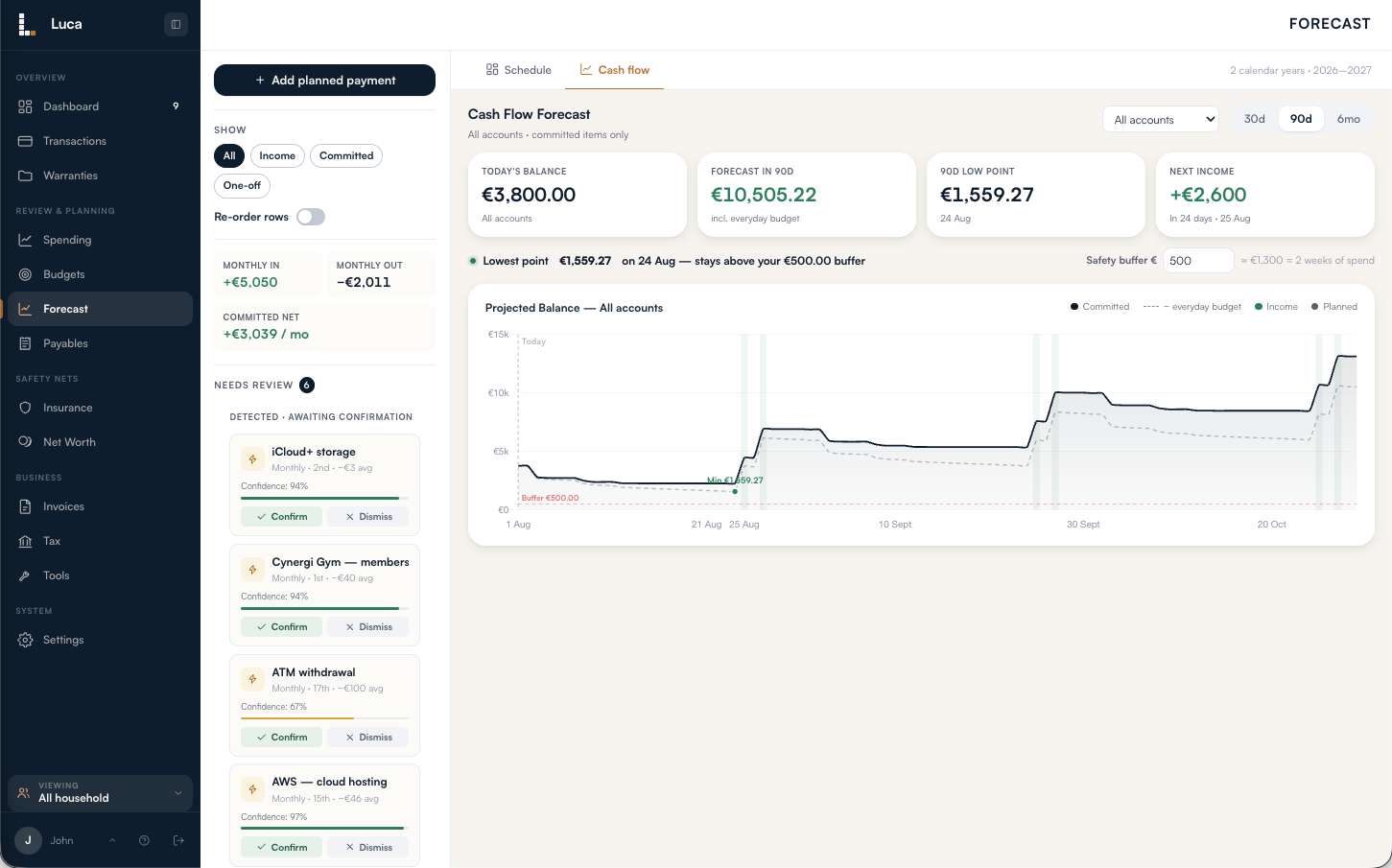
Freelance income is lumpy and bills are not. The forecast draws the daily running balance against a safety buffer you set, and marks the low point before you reach it.

Luca's cash-flow forecast: a daily running balance over ninety days with a safety buffer and a marked low point.

Bills you owe on your own schedule

Condominium dues, school fees, a deferrable utility. A payable sits in a backlog and ages from the vendor's date, while only the deadline you set raises an alert. It shows on the forecast as reduced headroom, not a false spike.

Lumpy costs, level months

Turn on saving up in advance for a quarterly or annual bill and Luca works out the monthly set-aside. Your safe-to-spend stays flat even though the real payment is not.

Recurring payments it spots for you

Luca reads the last twelve months for outgoings that repeat on a cadence and suggests them, with how regular they are. Suggestions only. Nothing enters the forecast until you confirm it.

The whole picture

The household half, in the same place

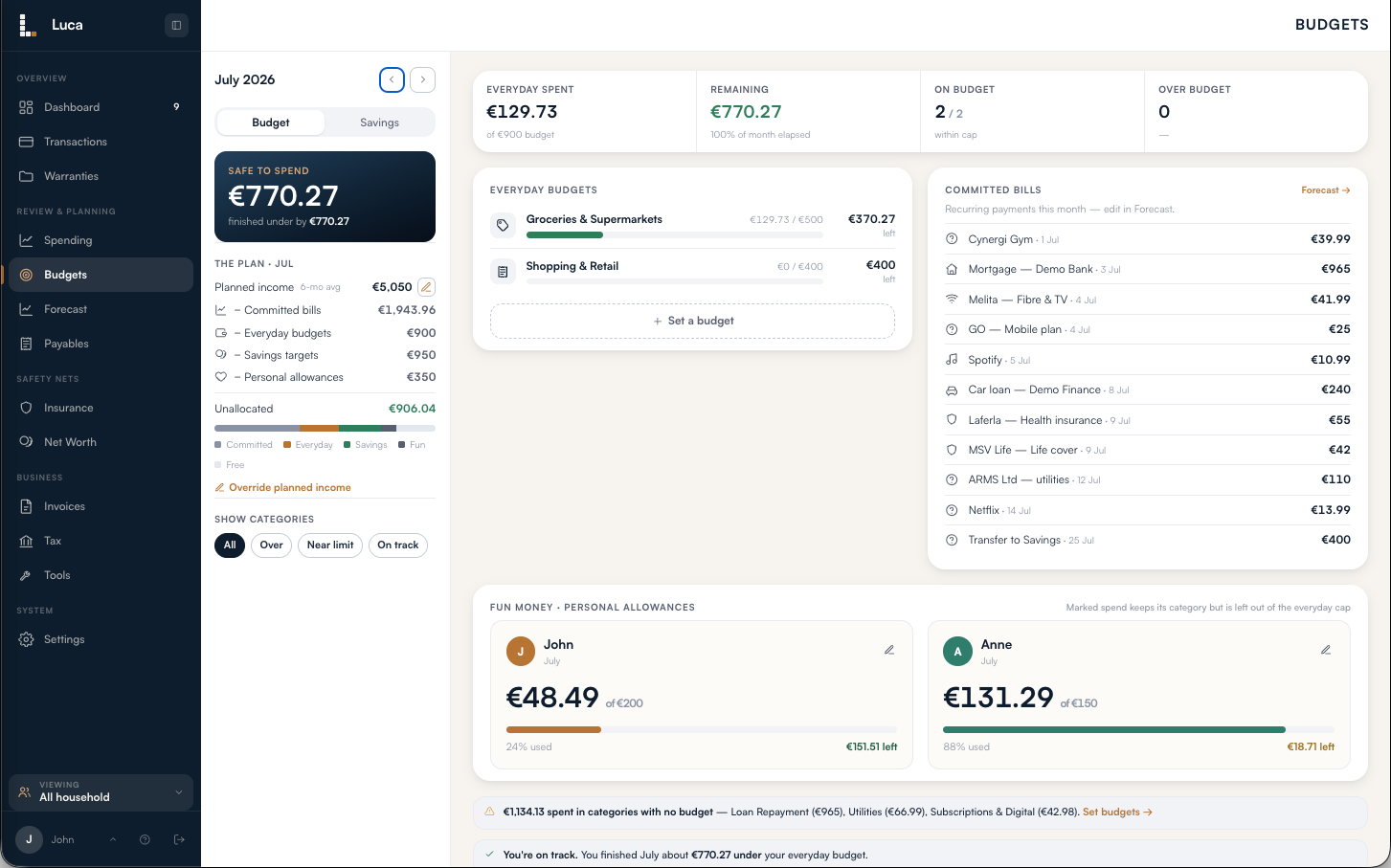
A monthly plan anchored to your average income, savings held as buckets inside real accounts, and a balance sheet that counts the house and the mortgage, not just cash.

Luca's budget: safe to spend, the allocation of planned income across bills, everyday caps and savings, and per-category caps.

Planned income less committed bills, everyday caps and savings targets. What is left is what is left.

Budgets and a personal allowance each

Safe to spend, with a rough per-day figure for the days left. In a joint household each person can have their own allowance, carved out of the one plan.

Savings as buckets, not another account

Each goal is a slice of whatever account already holds the money, with a target, a contribution and an honest on track or behind.

Net worth, including what you owe

Cash, investments and property less liabilities. Jointly held investments are tracked in units, so two people who bought in at different prices get correctly different gains.

Receipts filed against the right expense

Photograph the receipt when you pay, type the amount, and Luca suggests the match when the transaction lands a day or two later. It never reads the image and never attaches without you.

It is the same app on a phone

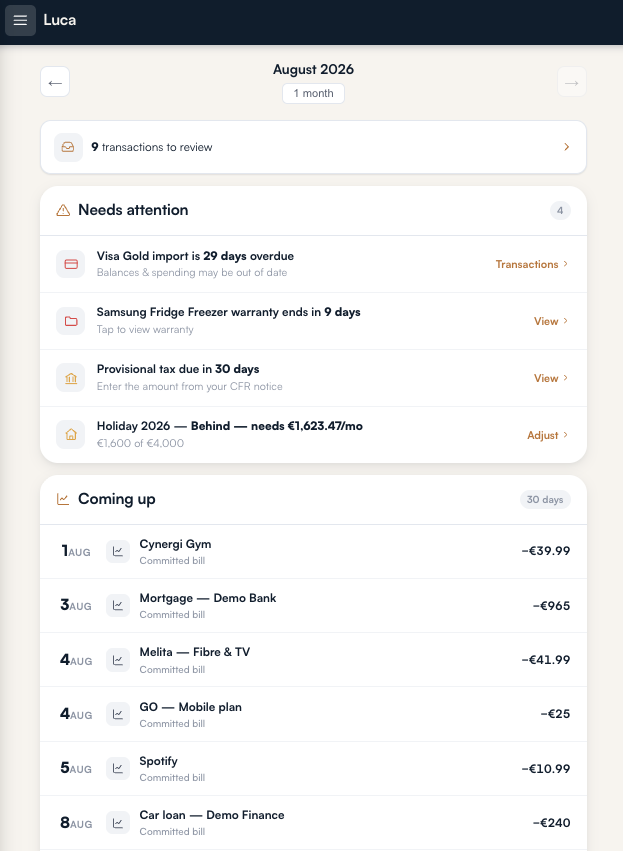
Luca runs in the browser and installs to the home screen on iOS and Android. Importing a statement, photographing a receipt or checking what is coming up all work from a phone, with no laptop involved.

Accounts are kept private per person where you want them. A private account disappears from everyone else's balances and feeds entirely, enforced in the data, not just hidden on screen.

Luca's dashboard on a phone: what needs attention, and the next thirty days of money.

Your accountant

Send the quarter, not the shoebox

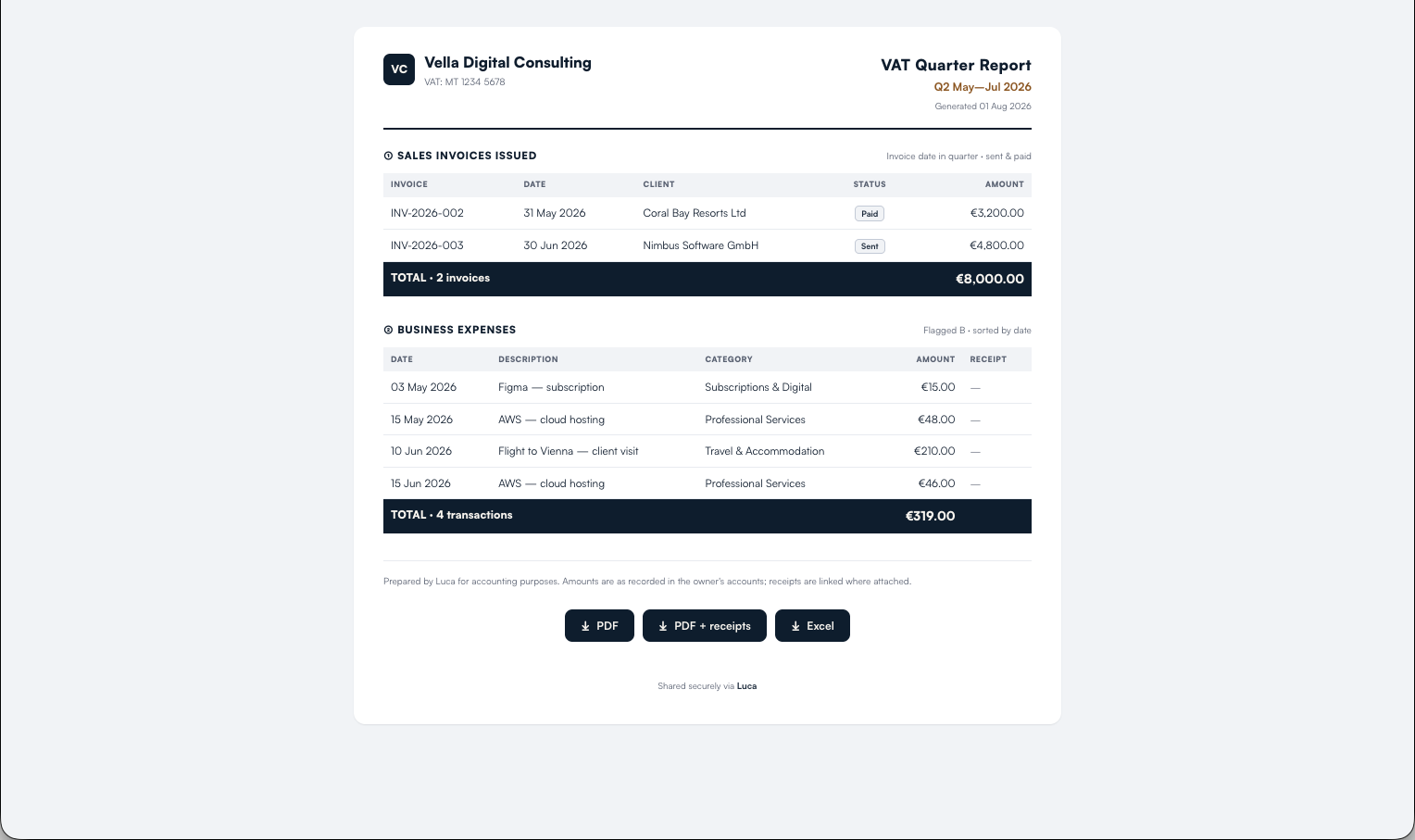
One page with the invoices you issued and every business-flagged expense, receipts linked. Your accountant opens a read-only link and takes the PDF, the PDF with receipts appended, or a spreadsheet.

No seat to buy and no login to hand out. The link expires after ninety days and you can stop sharing at any point.

Included in the one subscription.

The read-only quarter report as an accountant sees it: invoices issued, business expenses, and download buttons.

Pricing

One plan. One subscription for the household.

Everything on this page is in it. No tiers to compare, no per-person pricing, and the accountant's report costs nothing extra.

€79 a year

Works out at €6.58 a month, billed once a year.

Start a 30-day trial

Thirty days free, no card required. Luca Core is the only plan.

Included either way

Invoicing, clients, PDFs and payment matching

Tax set-aside, per person, with the deadlines built in

Spending, rules, budgets, savings and forecast

Net worth, insurance and warranties

Everyone in your household, at no extra cost

A free read-only report for your accountant

Billing. Payment, card changes, receipts and cancelling all happen on Stripe's hosted page, so Luca never holds your card. Cancel whenever you like.

Your data stays yours. Export the whole household as one structured file or a spreadsheet per table, any time. If a subscription lapses Luca turns read-only rather than locking you out, and your export still works.

Why Luca

Named after Luca Pacioli, the friar who in 1494 printed the first description of double-entry bookkeeping. His idea was that every entry has two sides, and that is still the reason a ledger can be trusted.

Five hundred years on, most of us keep our money in a folder of statements.
The Luca app helps you change that.

Questions

The things worth knowing before you start

Still unsure? Write to contact@joinluca.com and you will get a straight answer.

Does Luca connect to my bank automatically?

Not yet. Today you import your bank's statement CSV, from any device. Luca learns that bank's column layout the first time, so after that it is one click, and duplicates are skipped. Automatic daily sync is a later release, and we would rather say so here than have you find out after signing up.

Is the tax figure my actual tax bill?

No. It is arithmetic: the income you have actually received, multiplied by a rate you choose, less what you have already paid. It is there so the money exists when the bill arrives. Luca is not a tax calculator and does not give tax advice. The amount you owe comes from your assessment.

Does my accountant need an account?

No. They get a read-only report at a private link, with the PDF, the PDF plus receipts, or a spreadsheet to download. No seat, no login, no charge. You can stop sharing at any time, and the link expires after ninety days regardless.

Does it read my receipts?

No. There is no scanning of the image. You photograph a receipt and, ideally, type the amount. Luca then matches it to a transaction on date and amount when the transaction arrives, and asks you to confirm. The bank supplies the real figure.

How many people can use one subscription?

Everyone in your household. You set each person's access level, from full to read-only, and choose which areas they see. Read-only is enforced in the data, so it holds even if someone reaches a control they should not have.

Can I keep some accounts to myself?

Yes. Switch on Keep private for an account you own and it drops out of other members' balances, spending and feeds entirely. Shared accounts cannot be private, since privacy needs a single owner.

What if I want to leave?

Export everything first, as one structured file or as a spreadsheet per table. Cancelling is a button, handled on Stripe's page. You can also delete the household and everything in it permanently, which asks you to confirm twice because it cannot be undone.

Thirty days, no card, your own numbers in it

Import one statement and create one invoice. That is enough to know whether Luca is for you.

Start a 30-day trial Ask a question first